
October 2026
Oct 7
Optimize checkout upsells with quantity selectors and collapsible descriptions
Checkout upsell product cards now support:
Quantity selector:
Let shoppers adjust the quantity directly in the upsell.
Collapsible product description:
Give shoppers more product information without taking up additional space. Support Shopify Markets translations by region.
Test both features to measure their impact on checkout performance.
*Available for Shopify Plus stores only.
Quantity selector:
Let shoppers adjust the quantity directly in the upsell.
Collapsible product description:
Give shoppers more product information without taking up additional space. Support Shopify Markets translations by region.
Test both features to measure their impact on checkout performance.
*Available for Shopify Plus stores only.
Oct 7
Trigger native code when an experience is triggered
Visually can now notify your website whenever an experience is activated.
The callback provides the experience and variation details, allowing technical teams to trigger custom actions based on the experience shown to a shopper.
Use it to trigger custom logic on your website, such as applying custom theme changes based on an activated experience.
Learn how to set it up
The callback provides the experience and variation details, allowing technical teams to trigger custom actions based on the experience shown to a shopper.
Use it to trigger custom logic on your website, such as applying custom theme changes based on an activated experience.
September 2026
Sep 30
AI Settings page - Control how Visually uses AI for your store
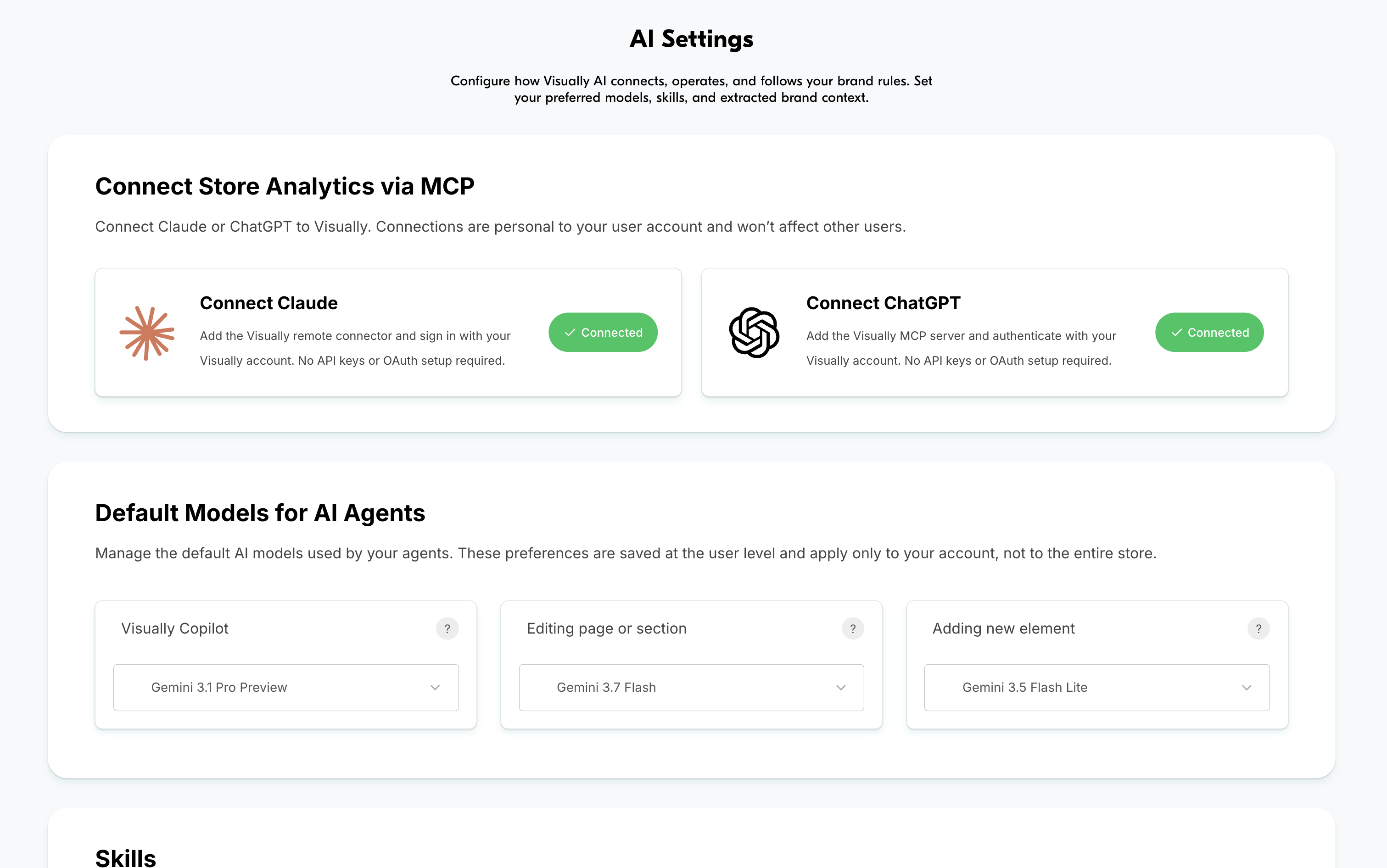
Customize your AI setup to work with your tools, follow your instructions, and align with your brand.
Visually MCP: Connect Visually to AI tools like Claude and OpenAI.
AI models: Choose the default models used by your AI agents.
Skills: Create reusable rules and instructions for AI agents working on your store.
Brand styles: Define styling guidelines to match your brand’s design.
AI Settings page
Visually MCP: Connect Visually to AI tools like Claude and OpenAI.
AI models: Choose the default models used by your AI agents.
Skills: Create reusable rules and instructions for AI agents working on your store.
Brand styles: Define styling guidelines to match your brand’s design.
Sep 22
Track live experiences and investigate data discrepancies with the Visually Chrome extension
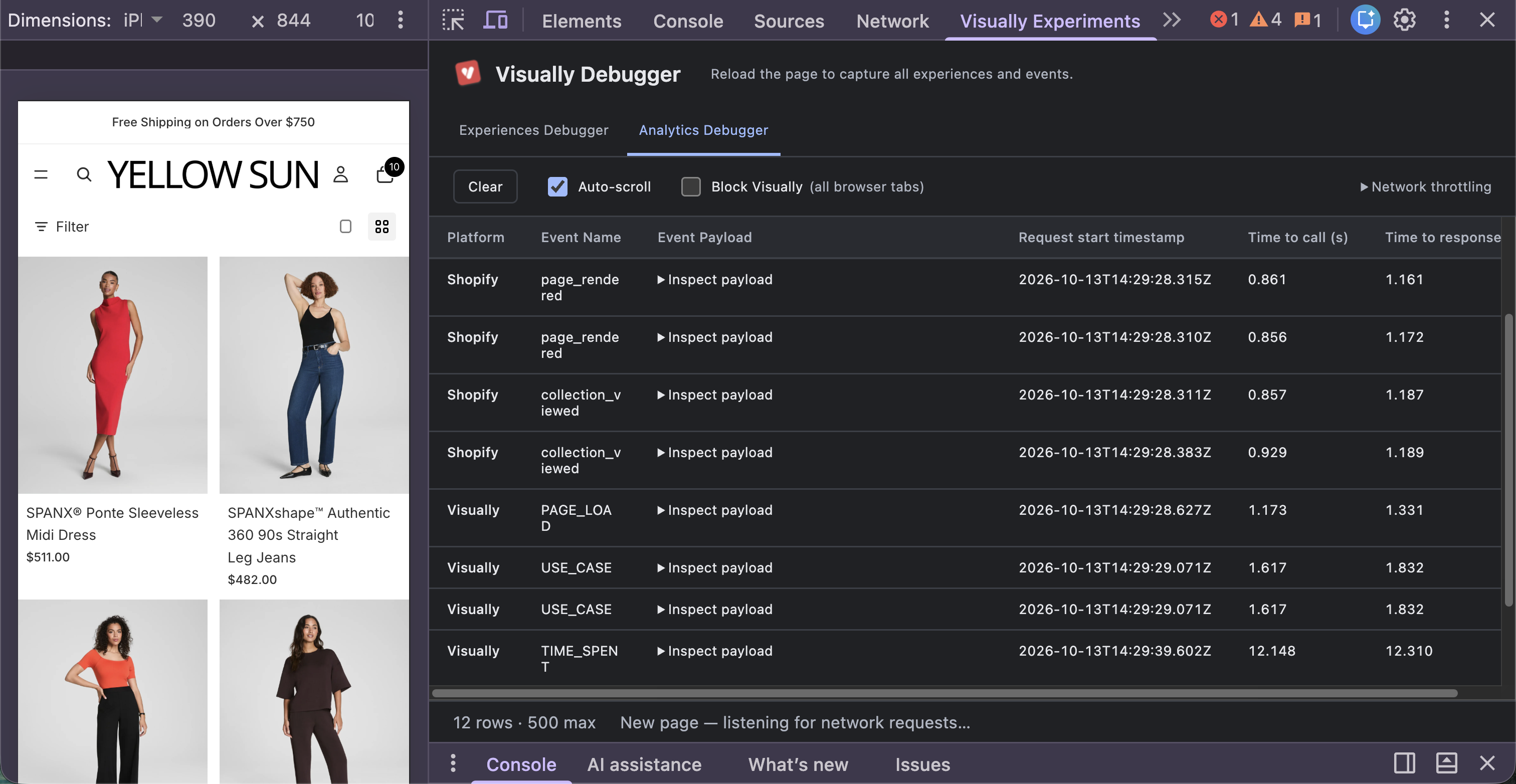
View live experiences running on any page and compare page events across platforms to identify data discrepancies.
Experiences Debugger
See all published experiences running on the page you're viewing.
Analytics Debugger
Compare event timing across Visually, Shopify, and Google Analytics to troubleshoot reporting discrepancies. More platforms will be supported in the future.
For example, differences in page-load timing can help explain inconsistencies in reported data. To track page loads, look for these event names:
Shopify: page_rendered
Visually: PAGE_LOAD
Google Analytics: page_view
Once installed, open your website, navigate to the page you want to inspect, open Inspect, and select the Visually Experiments tab.
Install the Visually Chrome extension
Experiences Debugger
See all published experiences running on the page you're viewing.
Analytics Debugger
Compare event timing across Visually, Shopify, and Google Analytics to troubleshoot reporting discrepancies. More platforms will be supported in the future.
For example, differences in page-load timing can help explain inconsistencies in reported data. To track page loads, look for these event names:
Shopify: page_rendered
Visually: PAGE_LOAD
Google Analytics: page_view
Once installed, open your website, navigate to the page you want to inspect, open Inspect, and select the Visually Experiments tab.
Sep 14
Generate experience details with AI
The new AI autofill option helps you complete experience details faster by generating key information in one click.
Description: Generates a hypothesis explaining the experience.
Labels: Suggests relevant categories.
Before/after images: Generates images for the control and all variants.
Description: Generates a hypothesis explaining the experience.
Labels: Suggests relevant categories.
Before/after images: Generates images for the control and all variants.
Sep 2
Connect Visually to Claude and ChatGPT with MCP
Connect your Visually account to Claude or ChatGPT and explore your store’s performance directly in your AI assistant. Analyze experiments, compare results, track revenue, and uncover insights using your live store data.
What you can do:
Analyze experiments:
Review performance and test results. Filter experience results by audience and view before-and-after images.
Review performance and test results. Filter experience results by audience and view before-and-after images.
Track revenue:
Explore direct and assisted revenue, orders, and sessions across different time periods.
Explore direct and assisted revenue, orders, and sessions across different time periods.
Manage all experiences:
Access published, paused, archived, and fully rolled-out experiences.
Connect multiple stores:
Access all your stores through a single connection.
Access published, paused, archived, and fully rolled-out experiences.
Connect multiple stores:
Access all your stores through a single connection.
And more
Sep 1
Updated Gemini models + Vertex AI endpoint
Default Gemini models have been upgraded for faster generation and better results.
New widgets: Gemini 3.5 Flash Lite
Section editing: Gemini 3.7 Flash
In addition, stability and success rates have been improved during high-traffic periods using Google’s Gemini Enterprise Agent Platform (Vertex AI) API endpoint.
These models are now the default for users who haven’t previously changed their model settings.
AI Settings page
New widgets: Gemini 3.5 Flash Lite
Section editing: Gemini 3.7 Flash
In addition, stability and success rates have been improved during high-traffic periods using Google’s Gemini Enterprise Agent Platform (Vertex AI) API endpoint.
These models are now the default for users who haven’t previously changed their model settings.
Sep 1
More efficient SDK integration for Shopify themes
The Visually SDK is now embedded directly into Shopify theme code, making it available immediately when the page loads and improving overall load efficiency.
Redirect-based tests, including theme, template, and redirect tests, now load significantly faster.
Redirect-based tests, including theme, template, and redirect tests, now load significantly faster.
Sep 1
Track email and phone submissions from Klaviyo
Visually now syncs with Klaviyo forms to track email and phone submissions, giving you more insight into how shoppers engage with your forms.
New metrics are available in Visually Reports:
Lead Submission Email:
Track the number of submissions that include an email address.
Lead Submission-Email Rate:
Track email submissions as a percentage of total sessions.
Lead Submission Phone:
Track the number of submissions that include a phone number.
Lead Submission-Phone Rate:
Track phone submissions as a percentage of total sessions.
August 2026
Aug 16
Metafield analyzer for AI agents
Our AI agents can now inspect product information stored in metafields before generating code. This helps them understand how complex data is structured and use it correctly. This improves the accuracy of AI-generated experiences that rely on complex metafield structures.
July 2026
Jul 14
Build audiences with AI
Describe the shoppers you want to target in a simple prompt, and Visually AI builds the audience for you. Create precise, targeted audiences without manually setting up complex rules.
For example: “Users who visited the pricing page in the last 7 days but didn’t make a purchase.” AI automatically turns the prompt into the right audience criteria.
For example: “Users who visited the pricing page in the last 7 days but didn’t make a purchase.” AI automatically turns the prompt into the right audience criteria.
Jul 7
RudderStack analytics integration
RudderStack is now available as an official analytics and tracking integration in Visually.
Integrations page